Managing medical documentation
Downloading every Dental EOB from Principal
At the end of the year it's a good time to make sure that you've downloaded all your insurance related paperwork to an archive you control but it can be a huge hassle to get it all at once.
In this example, I'll use some Javascript and Python code to download and rename all my statements from my Principal dental plan.
First, I've navigated to the Principal "Claims" page.
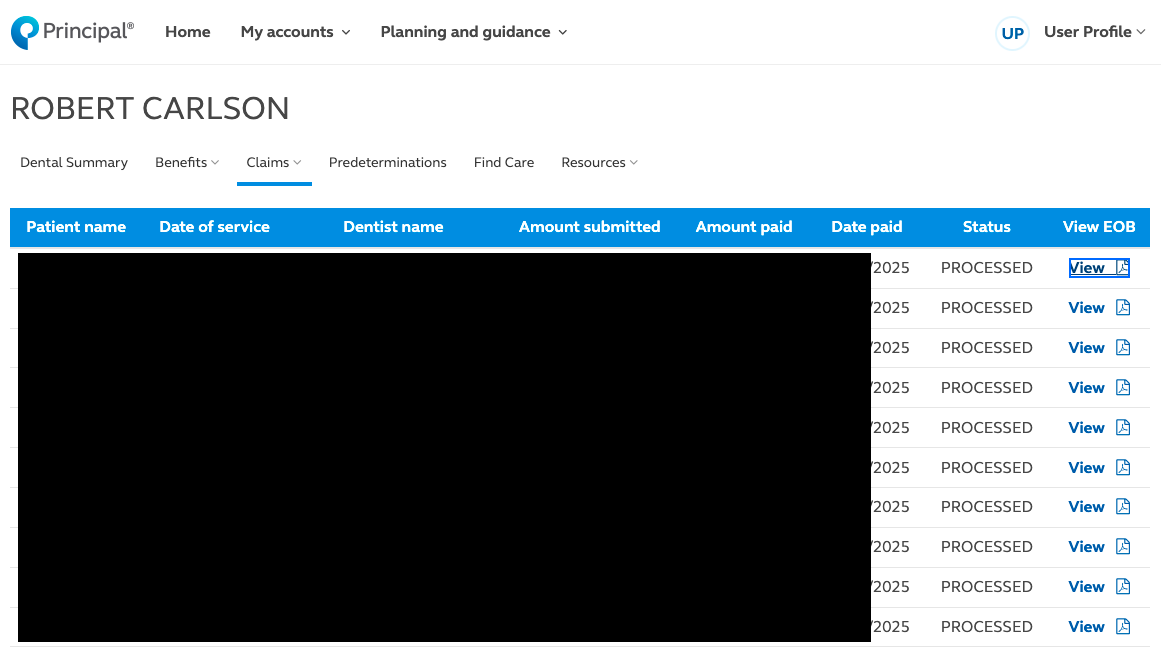
Clicking on one of these "View" buttons opens a new tab next to the one I have open and downloads a file with my name and member number as the filename. So by the end I have a bunch of files called ROBERT999999-34.pdf and I've had to click back to the main page a dozen times.
Instead, a click look in the browser Inspector says that each button has a data-heading of the string View EOB that looks like this:
<td data-heading="View EOB">
<div id="viewEob38" class="inner" style="text-align:center">
<a id="eobLink38" href="/member-web/downloadEob/dental/20220999999999" target="_blank">View
<i class="fa fa-file-pdf-o" aria-hidden="true"></i></a>
</div>
</td>
So I can open the Console on the browser and with a quick script I can open all those windows at once and start every download at the same time.
document
  .querySelectorAll('td[data-heading="View EOB"] a[href]')
  .forEach(link => {
    const url = link.href;
    if (url) {
      window.open(url, '_blank');
    }
  });
Now of course I have those files that are all named after me, but a quick Python script using pypdf can peer into each one, extract the unique (and date coded) encounter number, and output a quick bash script that will rename all the files appropriately.
import re
from pathlib import Path
from pypdf import PdfReader

def encounter_id(path):
    txt = "\n".join((p.extract_text() or "") for p in PdfReader(path).pages)
    m = re.search(r"Encounter ID\s*[:\-]?\s*([A-Za-z0-9\-]+)", txt, re.I)
    return m.group(1) if m else None

for pdf in Path(".").glob("*.pdf"):
    eid = encounter_id(pdf)
    if eid:
        print(f'mv "{pdf.name}" "{eid}.pdf"')
    else:
        print(f'# No Encounter ID found in {pdf.name}')
Once that's done I can put the properly named files where they belong in my archive.
Download EOB from Carefirst.com
From my logged in session and went to the EOB page, it makes a call to a search page that returns JSON to the front end as follows:
https://member.carefirst.com/mas/sec/searchMemberEOB.json?chunkSize=100&endDate=01/02/2026&startDate=01/02/2025&startIndex=0&groupId=ABCD&accountId=000000000000000&timeStamp=2026-01-02T18:46:45.489Z
With the unique query parameters being groupId and accountId.
It returns a payload with:
{
  "eobDetails": [
    {
      "index": "0",
      "eobDocumentNumber": "",
      "eobDocumentNumberFacet": "guid",
      "eobDocumentNumberNasco": "",
      "eobStatementDate": "01/01/1999",
      "eobClaimDetails": [
        {
          "claimNumber": "A123BC123456",
          "fromDateOfService": "01/01/1999",
          "toDateOfService": "01/01/1999",
          "memberFirstName": "John",
          "memberLastName": "Smith",
          "providerName": "PROVIDER LLC",
          "claimTotalAmount": "123.00",
          "memberDOB": "01/01/1999",
          "productCategory": "MEDICAL",
          "patientLiabilityAmount": "99"
        }
      ]
    }
  ]
}
Clicking on the "Download EOB" button calls Javascript to fetch files from the path:
https://member.carefirst.com/mas/sec/viewMemberEOBRedesignedDocument.pdf?documentIdentifierEncrypted=false&sourceSystem=TZF&documentIdentifier=GUID&accountId=000000000000000&timeStamp=2026-01-02T18%3A50%3A18.073Z
Where documentIdentifier is taken from the payload and accountId is taken from the search query.
Below is a JS script to run from the Firefox console which will query this URL, iterate over the values of eobDetails and retrieve each file by documentIdentifier in a new tab.
Replace groupId and accountId variables in the initializers.
(async () => {
  // 1) Build the search URL (edit dates / paging as needed)
  const searchUrl = new URL("https://member.carefirst.com/mas/sec/searchMemberEOB.json");
  searchUrl.searchParams.set("chunkSize", "100");
  searchUrl.searchParams.set("startDate", "01/02/2025");
  searchUrl.searchParams.set("endDate", "01/02/2026");
  searchUrl.searchParams.set("startIndex", "0");
  searchUrl.searchParams.set("groupId", "ABCD");
  searchUrl.searchParams.set("accountId", "000000000000000");
  searchUrl.searchParams.set("timeStamp", new Date().toISOString());

  // 2) Fetch the JSON. credentials: "include" ensures cookies are sent even if you paste this on another origin.
  const res = await fetch(searchUrl.toString(), {
    method: "GET",
    credentials: "include",
    headers: { "Accept": "application/json" },
  });

  if (!res.ok) {
    throw new Error(`searchMemberEOB failed: HTTP ${res.status}`);
  }

  const data = await res.json();
  const eobDetails = Array.isArray(data?.eobDetails) ? data.eobDetails : [];

  if (!eobDetails.length) {
    console.warn("No eobDetails found. Full response:", data);
    return;
  }

  // 3) Helper: try a few likely fields for the document identifier.
  // In your sample, the PDF URL uses documentIdentifier=... which often maps to a facet/uuid-like value.
  const getDocId = (eob) =>
    eob?.documentIdentifier ??
    eob?.eobDocumentNumberFacet ??
    eob?.eobDocumentNumber ??
    eob?.eobDocumentNumberNasco ??
    null;

  // 4) Open each PDF in a new tab (throttle slightly to avoid popup blockers / rate limits)
  const opened = [];
  for (let i = 0; i < eobDetails.length; i++) {
    const eob = eobDetails[i];
    const docId = getDocId(eob);

    if (!docId) {
      console.warn(`Skipping index ${i}: no document id found in`, eob);
      continue;
    }

    const pdfUrl = new URL("https://member.carefirst.com/mas/sec/viewMemberEOBRedesignedDocument.pdf");
    pdfUrl.searchParams.set("documentIdentifierEncrypted", "false");
    pdfUrl.searchParams.set("sourceSystem", "TZF");
    pdfUrl.searchParams.set("documentIdentifier", docId);
    pdfUrl.searchParams.set("accountId", "000000000000000");
    pdfUrl.searchParams.set("timeStamp", new Date().toISOString());

    // Open tab
    const w = window.open(pdfUrl.toString(), "_blank", "noopener,noreferrer");
    opened.push({ i, docId, pdfUrl: pdfUrl.toString(), opened: !!w });

    // Small delay reduces the chance of pop-up blocking / hammering the server.
    await new Promise(r => setTimeout(r, 250));
  }

  console.table(opened);
  console.log(`Attempted to open ${opened.length} PDFs.`);
})();
This script assumes you run it on member.carefirst.com while logged in, so your session cookies are sent automatically.
Pop-up blocking: Firefox may block multiple window.open calls unless they happen directly from a user gesture. If it blocks, run the script right after clicking in the console (or reduce it to open the first N). A workaround is to have it print URLs and then manually “Open all in tabs” via an extension, but the script above tries to be gentle with delays.
If you have more than 100, adjust startIndex and re-run, or extend this to loop startIndex += chunkSize until no results.
ChatGPT 5.2 was used to generate the code examples in this tutorial but the code was tested and verified by an actual developer.